
 Bobby Wilson
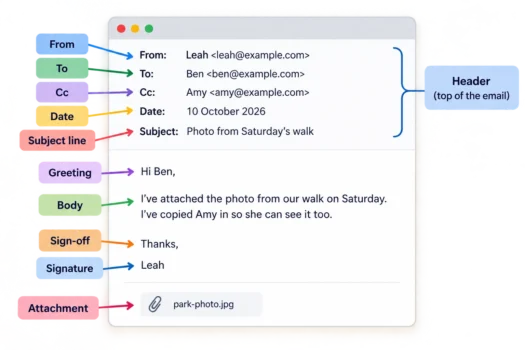
An ordinary email can have a From field, a To field, Cc and Bcc fields, a subject line, a greeting, a body, a sign-off, a signature and attachments. Together, these parts show who sent the message, who it is for, what it is about and what it contains, although not every email includes them all.
The Parts of an Email at a Glance
Below is an email from Leah to Ben, with Amy copied in and a photo attached. The lines above the message show who sent it, who received it and the subject, while the lines underneath contain Leah’s words. The photo appears as a filename rather than a sentence in the message, making it easier to recognise the attachment.
From: Leah leah@example.com
To: Ben ben@example.com
Cc: Amy amy@example.com
Date: 10 October 2026
Subject: Photo from Saturday’s walkHi Ben,
I’ve attached the photo from our walk on Saturday. I’ve copied Amy in so she can see it too.
Thanks,
Leah
📎 park-photo.jpg
| Part | What it tells you |
|---|---|
| From | Who sent the email |
| To | Who the email is addressed to |
| Cc | Who else receives a visible copy |
| Bcc | Who receives a copy without being shown to other recipients |
| Date | When the email was sent |
| Subject line | What the email is about |
| Greeting | How the message opens |
| Body | The main message |
| Sign-off | How the message closes |
| Signature | The sender’s name or other identifying details |
| Attachments | Files included with the email |
These names describe the parts of a message, not a fixed template that every email has to follow. For instance, Leah’s email includes Cc and an attachment but has no Bcc recipients.
The Header: The Top of an Email
The top section of an email, showing From, To, Cc, the date and the subject line, is often called the header. In Leah’s example, it is everything above “Hi Ben”. The date and time show when the email was sent.
The term email header also has a technical meaning: a longer block of information about the message that is normally hidden from view.
From, To, Cc and Bcc
The From field names the sender, Leah, and appears near the top of the message. The To field names the recipient, Ben, who the email is addressed to. The email addresses beside their names show where the message came from and where it is going.
Cc and Bcc stand for carbon copy and blind carbon copy, and Amy appears under Cc because she receives a visible copy. The difference is that Cc addresses are visible to other recipients, while Bcc recipients’ addresses are hidden from the other recipients but not from the sender. People receiving a Bcc copy can still see the To and Cc addresses.
What Is a Subject Line in an Email?
The subject line is a short line of text saying what an email is about. It appears near the top of an open email, above the message, and is also commonly shown in the inbox list before the email is opened. When someone writes an email, they type it into the box labelled Subject, above the space for the message.
The subject helps readers recognise the topic at a glance and find the email again later, without having to open each message. In the example, “Photo from Saturday’s walk” tells Ben what the email is about, whereas a subject such as “Hello” would not. The subject is separate from the body, which contains the message itself.
A subject can be left blank and the email will still send, but the reader then has no subject to tell them the topic until they open it. The abbreviations Re: and Fwd: appear before the original subject, with Re: marking a reply and Fwd: or FW: marking a forwarded email. A reply may join the earlier messages in an email thread, which groups related messages into one conversation.
The Greeting and Email Body
“Hi Ben” is the greeting, also called a salutation, at the start of Leah’s message. These are the opening words directed to the person receiving the email, before the main text begins. Some emails open with a greeting like this, while others go straight into the message. The greeting is not the same as the To field, even though both refer to the person receiving the email.
After the greeting comes the email body, where the main message appears. Leah uses it to tell Ben that she has attached a photograph and that Amy has received a copy. An email body may contain a few words or several paragraphs, and it can include links or pictures as well as text.
The Sign-Off and Signature
At the end of Leah’s email, “Thanks” is the sign-off, also called the closing. It appears after the main message and before Leah’s name, bringing the written message to an end. Some emails finish without a separate sign-off, leaving only the message itself or the sender’s name.
The name “Leah” below the sign-off is her email signature, telling Ben who sent the message. An email signature may also include contact details and can sometimes be added automatically rather than typed each time.
Attachments
An attachment is a separate file included with an email, such as a photograph or document, instead of words written directly into the body. In Leah’s message, park-photo.jpg is the photo attached for Ben, and it appears separately from the written message. An attachment is usually marked with a paperclip symbol, like the one shown beside the file in the example.