
 Bobby Wilson
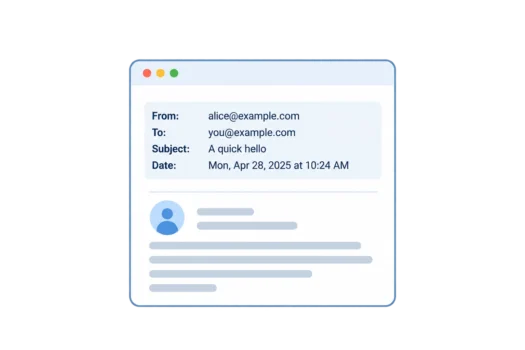
An email header is the part of an email that holds information about the message, such as who it is from, who it is to, the subject and the date, along with technical details about how it was delivered. You normally see only a few of these lines at the top of an email, while the full header, which is usually hidden, holds the rest.
The Email Header You See and the Full Header
When you open an email, the sender’s name, recipient, subject and date are usually shown near the top. They are among the parts of an email. The words someone has written underneath are called the email body, and they are separate from the header.
The full header contains the information behind those familiar details, along with extra records used as the message travels to your inbox. Most email services hide these longer records because they are not needed for everyday reading. A full header looks like a block of labelled lines, and only a few of them matter to most people.
What Do the Lines in an Email Header Mean?
This shortened example shows an email Leah sends to Sam about their Saturday plans. Real email headers are often much longer because they contain further technical records.
Return-Path: <bounces@example.com>
Received: from mx.example.com ([192.0.2.20]) by inbox.example.com; Mon, 12 Oct 2026 09:05:00 +0000
Received: from send.example.com ([192.0.2.10]) by mx.example.com; Mon, 12 Oct 2026 09:04:00 +0000
Authentication-Results: inbox.example.com; spf=pass smtp.mailfrom=example.com; dkim=pass header.d=example.com; dmarc=pass header.from=example.com
From: Leah <leah@example.com>
To: Sam <sam@example.com>
Reply-To: leah@example.com
Subject: Saturday plans
Date: Mon, 12 Oct 2026 09:03:00 +0000
Message-ID: <sat-plans-1@example.com>
Each line starts with a name that tells you what kind of information follows. Here is what the main lines mean in Leah’s email:
- From: The name and address the message claims to be from, in this case Leah.
- To: The address of the intended recipient, Sam.
- Subject: The message’s subject, Saturday plans.
- Date: The date and time recorded when the message was prepared or sent, not necessarily when Sam received it.
- Reply-To: The address replies should go to. Here it is the same as Leah’s From address, but it matters when the two addresses differ.
- Return-Path: The address used for delivery-failure notices. It is not the normal reply address.
- Received: Records added by mail servers, which are computer systems that handle email delivery. The newest record usually appears at the top.
- Message-ID: An identifier assigned to this particular message.
- Authentication-Results: The results of checks that help a receiving email service determine whether a message was sent using an authorised email domain, the part of an address after @.
The two Received entries show separate stages in the delivery of Leah’s message, rather than two different emails. They are part of how email works as messages move between mail servers.
SPF, DKIM and DMARC are three email checks whose results can appear under Authentication-Results. Passing those checks does not mean the email itself is safe.
Why Would You Look at an Email Header?
Most people never need to open a full header. It can be useful when a message seems unexpected or suspicious, particularly if you are concerned about phishing, an attempt to trick someone into sharing information or taking an unsafe action.
A header may provide clues about the sender, but it is only one part of telling whether an email is real. You might also examine it when a message arrives much later than expected, as the Received entries can help show where time was spent. If a message cannot be delivered, a bounced email or delivery-failure notice may offer more direct information about what went wrong.
How to View the Full Email Header
Most email services provide an option to display the complete header or original message. You will usually find it in a menu for the individual email rather than within the body of the message.
- Gmail: Choose More > Show original.
- Outlook.com and new Outlook: Choose More actions > View > View message details.
- Apple Mail on Mac: Choose View > Message > All Headers.
- New Yahoo Mail: Choose More options > View Raw Message.
These options are in the web or computer versions of each service.
What Is an Email Header Analyser?
An email header analyser is a tool that turns technical header lines into information that is easier to read. You paste the full header into the tool, which sorts it into a readable summary of the delivery route, any delays and the authentication results.
Two free options are Google Admin Toolbox Messageheader and Microsoft Message Header Analyzer. They can help you read the route and timing information in a header without interpreting every line yourself. However, an analyser cannot prove that an email is genuine or that its contents are safe.
A full header includes email addresses and technical details about a message, so it is worth treating as private information before pasting it into an online tool.
What Can and Can’t an Email Header Tell You?
The From line can be faked, a practice known as email spoofing, so it does not prove who sent a message. Received lines are added by the mail servers that handled the message, but earlier entries can also be made up.
These records can help identify the servers involved in delivery, but they do not reliably identify the sender’s own device. An IP address is a number used to identify a device or service on a network, and the address shown in a header may belong to an email service’s server instead of the sender. An IP address is not a home address and does not tell you someone’s exact physical location.
A header is one kind of email metadata, meaning information about a message, such as addresses, dates and delivery details, rather than the words written inside it.