
 Bobby Wilson
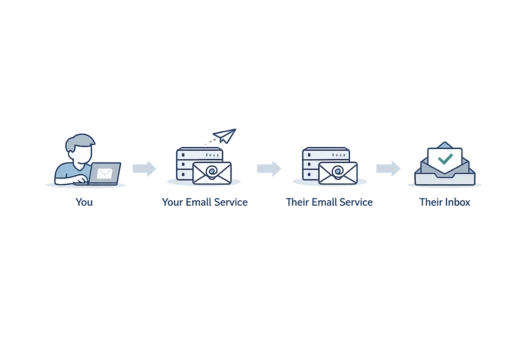
Email works by passing your message from your email service to the recipient’s email service. Your service checks the address, sends the message, the other service checks it, and then places it in the recipient’s inbox so they can open it in a website or app.
You → your email service → their email service → their inbox
That is the simple route. There are more steps behind the scenes, but most people only need this basic journey to understand how email gets from one person to another.
Step 1: You Write and Send the Message
The journey starts when you write a message in an email website or app. This might be Gmail, Outlook, Yahoo Mail, Proton Mail, Tuta, or another email service.
When you press Send, the message begins moving. It does not appear by magic in the other person’s inbox. It first goes to the email service you are using.
This page focuses on the journey a message takes, rather than explaining what email is from the start. Here, the important idea is simple: pressing Send hands the message to your email service.
Step 2: Your Email Service Takes Over
Your phone, laptop, or tablet does not usually deliver the email by itself. Your email service does that for you.
An email service is the company or system that holds your email account and sends messages on your behalf. Gmail, Outlook, Yahoo Mail, Proton Mail, and Tuta are all examples of email services.
This is an important modern way to think about email. The app or website is what you see on screen, but the email service is what handles the message.
So when you send a message from your phone, your phone is not personally carrying it to the other person’s phone. Your email service takes the message and starts the delivery process.
Step 3: The Address Tells the Message Where to Go
Your email service looks at the recipient’s email address. The most useful part for this journey is the part after the @ sign.
For example, if an address ends in gmail.com, the message needs to reach Gmail. If it ends in a company’s website-style name, the message needs to reach that company’s email service.
You do not need to know the hidden lookups that happen behind this. For a beginner, the useful idea is that the address tells your email service where the message belongs.
This is like putting the right address on a letter. The address does not carry the letter by itself, but it tells the delivery system where the letter needs to go.
Step 4: Email Services Pass the Message Along
Once your email service understands where the message should go, it sends the message towards the recipient’s email service.
Behind the scenes, email services use a rule system called SMTP to send messages to each other. You do not need to know the details to understand the journey.
The simple version is enough: your email service passes the message to the other person’s email service.
This is the point where the postal idea is useful. You give the letter to the postal system, and it moves it towards the right place. With email, your email service moves the message towards the recipient’s email service.
Step 5: The Receiving Service Checks the Message
When the recipient’s email service receives the message, it may check it before showing it in the inbox.
These checks are part of modern email. The service may look for signs that the message is unwanted, unsafe, or suspicious. It may notice a strange sender, a suspicious link, or something that looks like spam. It can also check whether the message really came from the sender it claims to be from, using checks called SPF, DKIM and DMARC.
Spam means unwanted email, often sent to many people at once. A suspicious link is a link that may not be safe to open.
If the message looks normal, it may go to the inbox. If it looks unwanted, it may go to the spam or junk folder. If something looks very wrong, it may be blocked.
This is why two people can send similar messages, but one arrives in the inbox and another lands in spam. The receiving service is making a judgement before the recipient sees it.
Step 6: The Message Appears in the Inbox
If the receiving service accepts the message, it places it in the recipient’s inbox.
The inbox is usually kept by the email service. That is why a person can often open the same inbox on a phone, laptop, tablet, or web browser.
Webmail means reading email through a website. An email app is an app on a phone, tablet, or computer that shows the email account. The difference between webmail and email apps mostly comes down to where you prefer to read your messages.
For example, someone might open the same message in Gmail on a browser and later see it in the Gmail app on a phone. The message is not tied to only one screen. The email service keeps the inbox, and the website or app shows it.
Some apps use settings called IMAP and POP3 to collect or sync messages, but those settings are separate from the basic delivery journey.
The main idea is that modern email follows the person across devices. The inbox is not just sitting on one computer.
Does Email Work the Same in Different Services?
The basic route is similar across most email services. One email service sends the message, another email service receives it, and the message appears in an inbox if it is accepted.
That basic route is similar whether someone uses Gmail, Outlook, Yahoo Mail, Proton Mail, Tuta, workplace email, or another service. The screens may look different. The apps may feel different. The privacy features may also differ.
That last point matters, but it should not make the journey confusing. The route can be the same while the privacy layer is different.
Some private email providers add stronger privacy features, but the basic delivery route still follows the same idea.
The broader question of whether email is private is separate from the basic delivery route. This article only needs the simple idea: the message still travels from one email service to another, even when privacy features differ.
Why Emails Sometimes Do Not Arrive
Sometimes an email does not reach the inbox. If you are waiting for a message that has not turned up, there are several reasons you might not be receiving emails worth checking.
The address may have been typed wrongly. The receiving service may have moved the message to spam or junk. The message may have been blocked. There may also be a temporary problem with one of the email services.
Sometimes the sender receives a failure message, often called a bounced email. This is an automatic message saying the email could not be delivered. It can happen when the address does not exist, the message was rejected, or the delivery problem could not be fixed.
This does not mean email is broken. It usually means something in the journey stopped the message before it reached the inbox.
Email is not delivered by your device alone. Your email service sends it, the other service receives it, and the inbox shows it to the person you wrote to. You do not need to know every hidden technical step to understand the basic journey.