
 Bobby Wilson
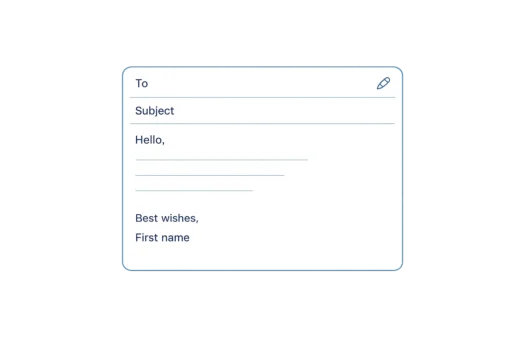
To write an email, use a clear subject, a suitable greeting and an opening sentence that explains why you are writing. Add the information or question the recipient needs, then finish with a closing sentence, an appropriate sign-off and your name. Match the wording and tone to the recipient and purpose.
What is the basic format of an email?
A simple email can usually be organised in this order:
- To: The email address of the person receiving the message.
- Subject: A brief description of what the email is about.
- Greeting: The words used to address the recipient, such as “Hello” or “Dear Customer Support”.
- Opening sentence: The first sentence, which normally explains why you are writing.
- Main message: The information the recipient needs.
- Question, request or next step: What you need the recipient to answer or do.
- Closing sentence: A final sentence that finishes the message politely or confirms what happens next.
- Sign-off: A phrase such as “Best wishes” or “Kind regards”.
- Name: The name of the person who wrote the email.
The To field contains the recipient’s email address. The remaining parts explain the purpose of the message and help the recipient understand how to respond.
Not every email needs several paragraphs. A short message may contain only a greeting, one or two sentences, a sign-off and a name. Formal wording is also not required in every situation. The basic format stays similar, but the wording changes according to the recipient and purpose.
How to write an email step by step
- Decide why you are writing. Identify the main question, information or purpose.
- Write a clear subject. Briefly describe what the message concerns.
- Choose a suitable greeting. Match it to the recipient and level of formality.
- State the reason for writing. Make the purpose clear near the beginning.
- Add the necessary information. Include the details the recipient needs.
- Make the next step clear. State any question, request or action.
- Write a closing sentence. Ask for a response, express thanks or confirm what happens next.
- Add a sign-off and your name. Choose wording that suits the situation.
- Check the email. Review the subject, message, details, tone and any attachments.
Decide why you are writing
Understanding the purpose makes it easier to decide what information the email should contain.
Common reasons for writing include:
- Asking a question.
- Confirming a plan.
- Requesting information.
- Sending information.
- Thanking someone.
- Responding to an earlier message.
- Making an appointment.
- Contacting a company or organisation.
Try to describe the purpose to yourself in one sentence before writing. For example:
I need to confirm whether we are still meeting on Tuesday.
That sentence gives the email a clear direction. The subject can identify the meeting, the opening sentence can explain why you are writing and the main question can ask for confirmation.
An email can contain more than one point when the subjects are closely related. However, unrelated questions may be easier for the recipient to understand and answer when they are sent in separate messages.
How to write an email subject
The subject line briefly identifies what the message is about. It normally appears with the sender’s name in the recipient’s inbox, so it should give a useful description of the email.
Clear subjects include:
- Meeting time for Tuesday
- Question about my booking
- Photographs from Saturday
- Appointment confirmation
- Updated document for review
These subjects identify a specific topic. They help the recipient understand the message before opening it and make the email easier to recognise later.
Vague subjects include:
- Hello
- Question
- Important
- No subject
“Question” does not explain what the question concerns. “Important” describes the writer’s view of the message but not its subject. Leaving the subject empty gives the recipient no information about the email.
There is no subject length that works for every message. Use enough words to identify the purpose, but remove words that do not add useful information.
How to start an email
The way you start an email depends on the recipient, your relationship with them and how formal the situation is.
The opening normally contains two parts:
- A greeting.
- A first sentence that explains why you are writing.
Possible greetings include:
- Hi [First name],
- Hello [First name],
- Dear [First name],
- Hello,
- Dear Customer Support,
“Hi” may suit someone you know or a relaxed conversation. “Hello” is neutral and can work in many ordinary situations. “Dear” is slightly more formal, but it is not required for every formal message.
When you do not know the recipient’s name, you can use a role, team or department, such as “Dear Customer Support”. A neutral “Hello” may also be suitable, depending on the situation.
Follow the greeting with a clear opening sentence. For example:
- Are we still meeting at 2 pm on Tuesday?
- I am writing to ask whether my booking can be changed.
- Thank you for sending the document.
- My name is First name, and I am contacting you about my appointment.
An introduction is useful when the recipient does not know who you are. It does not need to contain your full background. Give only the information needed to explain your connection to the subject.
Tone means the attitude or feeling communicated by your wording. Choose a tone that fits the relationship and situation. Formal language is not automatically better than clear, natural language.
How to write the main message
Put the important point near the beginning of the email. Then provide the details the recipient needs to understand it.
Use separate paragraphs when the message contains different ideas. Short paragraphs can be easier to follow on a screen, particularly when the email is read on a phone.
Keep each paragraph focused. Include relevant dates, times, names or reference details, but remove information that does not help the recipient understand or respond.
Questions and requests should be easy to find. Avoid hiding the main point inside a long or uncertain sentence.
Vague:
I was wondering if you could possibly let me know about the thing we discussed before.
Clearer:
Could you confirm whether the appointment is still scheduled for 10 am on Friday?
The clearer version identifies the required action, the appointment, the time and the date. The recipient can understand the question without guessing what “the thing” refers to.
Use wording that suits the recipient. An email to a close friend may sound conversational. A message to an organisation may use more neutral wording. Both can still be clear and polite.
How to ask a question or make a request
The recipient should be able to identify what answer or action you need.
Useful examples include:
- Could you confirm whether Tuesday is suitable?
- Please send the updated document by Friday.
- Could you tell me whether my booking can be changed?
- Please let me know which time works best for you.
Polite wording can still be direct. Adding “please” or using “could you” can soften a request without making it vague.
When a deadline matters, state the date clearly. When several answers are possible, explain what information you need. For example:
Please let me know whether you prefer the morning or afternoon appointment.
Avoid placing several unrelated requests in the same paragraph. Separate them where necessary so the recipient can see and answer each question.
How to end an email
An appropriate way to end an email normally includes:
- A final sentence.
- A sign-off.
- The writer’s name.
The final sentence completes the message. It might ask for a response, express thanks or confirm what happens next.
Examples include:
- Please let me know whether that time works for you.
- Thank you for your help.
- I look forward to hearing from you.
- I will send the updated information tomorrow.
After the final sentence, add a sign-off. Common choices include:
- Thanks: Suitable when thanking the recipient or making a request.
- Best wishes: Polite and friendly.
- Kind regards: Polite and moderately formal.
- Regards: Neutral and brief.
- Yours sincerely: A traditional formal sign-off in British English, commonly used when the recipient has been addressed by name.
The right choice depends on the recipient, purpose, local customs and level of formality. No sign-off is suitable for every email.
Place your name below the sign-off:
Kind regards,
First name
A typed sign-off is different from an automatic email signature. An automatic signature is saved text that the email service can insert at the bottom of messages. It may include your name and contact details. You can still type a closing sentence and sign-off above it.
A simple example of an email
To: firstname.lastname@example.com
Subject: Meeting time for Tuesday
Hello,
Are we still meeting at 2 pm on Tuesday?
I have the address from your previous message, but please let me know if the location has changed.
Please confirm whether the time and location are still suitable.
Best wishes,
First name
This example gives the recipient a clear subject, explains the reason for writing, includes the relevant information and asks a direct question.
Formal and informal email examples
Formal, professional and informal emails can use the same basic structure. The main difference is the wording and level of familiarity.
Informal email
Subject: Photographs from Saturday
Hi,
Could you send me the photographs you took on Saturday?
Please send them when you have time.
Thanks,
First name
Formal or professional email
Subject: Request for photographs from Saturday’s event
Dear Events Team,
I am writing to ask whether the photographs from Saturday’s event are available.
Please let me know whether they can be sent by email.
Kind regards,
First name
Both emails state the purpose and make the request clear. The informal version is more conversational. The formal version uses more neutral wording and a more formal greeting and sign-off.
Check the email before sending
Before sending the message, check:
- Does the subject describe the message?
- Is the recipient’s name correct?
- Is the reason for writing clear?
- Is the important information included?
- Is the question or request easy to understand?
- Are dates, times and names correct?
- Is the tone suitable?
- Are paragraphs used where they improve readability?
- Is any mentioned file attached?
- Are the spelling and grammar clear enough to understand?
Read the message from the recipient’s point of view. Check whether a very short sentence could sound impatient or whether humour could be misunderstood. Avoid writing entire words or sentences in capital letters because they may be interpreted as shouting.
When a message refers to a document, photograph or other file, confirm that it is present. The process used to attach a file to an email depends on the email service and device.
Once the wording is complete, sending an email involves entering the recipient, subject and message into the email service and selecting Send. Writing the email and sending it are separate parts of the process.
A useful email does not need complicated wording. It needs a clear purpose, a tone that suits the recipient and enough information for the person to understand the message and respond.