
 Bobby Wilson
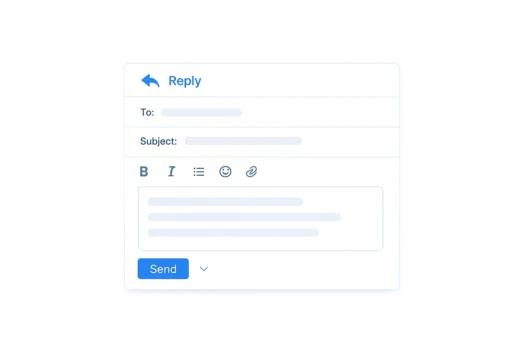
To reply to an email, open the message, select Reply, write your response, check who will receive it and select Send. Use Reply all only when everyone included in the conversation needs your answer. A useful reply should answer the message clearly and explain any next step.
The simplest way to reply to an email
The basic process is the same on most computers, phones and tablets:
- Open the email you want to answer.
- Select Reply.
- Write your response.
- Check the recipient.
- Select Send.
The Reply control may appear as a button, a curved arrow or an option inside a menu. Its exact position depends on the email service and device.
You normally do not need to enter the recipient or subject again. Your email service keeps the original subject and connects your response to the previous messages. This group of related messages is called an email thread or conversation.
Earlier messages may appear beneath your response or be hidden until you select them.
Reply or Reply all?
Use Reply when your answer should go only to the person who sent the message.
Use Reply all when the sender and every other visible recipient need your response. This normally includes people in the To and CC fields.
For example, imagine someone sends information about a family event to you and three relatives. Use Reply if you want to ask the sender a private question. Use Reply all if you are confirming information that everyone needs, such as which date you can attend.
Always check the recipient list before sending. A person may have been included in the original message but may not need to receive every response.
People included through BCC are hidden from the other recipients. Selecting Reply all in a message you received through BCC may reveal that you received it, so check the recipient list carefully. The wider differences between CC and BCC are useful when several people are involved in a conversation.
Use Forward instead when someone outside the existing conversation needs to receive the original message. Forwarding an email creates a new message containing a copy of it rather than sending a response to the original sender.
What should you write in the reply?
A clear reply normally does three things:
Acknowledge the message where useful → answer it → make the next step clear
You do not need to repeat the original email. The earlier messages already provide the context, so a reply is usually shorter than writing an email from the beginning.
For example:
Hello [First name],
Tuesday at 2 pm works for me. I will meet you at the address in your previous message.
Best wishes,
First name
This reply answers the main point and confirms what will happen next.
A shorter response may be enough when the context is already clear:
Tuesday at 2 pm works for me. See you then.
You do not have to begin every reply with “Thank you for your email”. It can be polite and useful in some situations, but a direct answer often sounds more natural, particularly when several messages have already been exchanged.
When replying, make sure you answer what the sender actually asked. Include any information they need and explain what will happen next where this is not already clear.
How to answer several questions
When an email contains several questions, answer them in the same order. This makes it easier for the recipient to follow your response and see whether anything has been missed.
Short paragraphs may be enough. Numbered answers can help when the sender has asked several separate questions:
Hello [First name],
- Thursday morning is suitable.
- I will bring the completed form.
- I do not need a parking space.
Best wishes,
First name
Before sending, look at the original message again and check that you have answered every important question.
For a longer message, you can copy a short question into your reply before answering it. This is known as quoting. Use only the part needed to make your answer clear rather than copying large sections of the original email.
How to acknowledge an email
Acknowledging an email means confirming that you received or saw it.
This can be useful when:
- The sender needs to know the message arrived.
- You received a document or attachment.
- You cannot provide a full answer immediately.
- You want to say when a complete response will follow.
A simple acknowledgement might say:
Thank you for your email. I have received the document.
To confirm that a file arrived correctly:
Thank you. The attachment arrived correctly.
When a fuller answer will take longer:
I have received your message and will reply fully by Friday.
Only promise a date that you expect to meet. An acknowledgement is not necessary for every ordinary email. Send one when confirmation would genuinely help the sender.
How to reply professionally
A professional reply should be clear, respectful and specific. Professional does not mean long, impersonal or filled with formal phrases.
The recipient should be able to understand:
- Your answer.
- Any relevant date or action.
- What will happen next.
- Whether you need anything from them.
For example:
Hello Appointments Team,
Thank you for confirming the appointment. I will attend on Thursday at 10 am. Please let me know if I need to bring any documents.
Kind regards,
First name
This works because it confirms the arrangement and asks a clear question. It does not need complicated phrases such as “Kindly be advised” or “Please be informed that”.
When replying to a company, teacher, manager or organisation, use neutral and polite wording. Include the information needed to answer the message, but avoid adding unnecessary detail.
Do you need a greeting and sign-off?
A first or detailed reply will often include a greeting and sign-off:
Hello [First name],
Thank you for the information. I have completed the form and will return it tomorrow.
Best wishes,
First name
A brief reply later in an active conversation may not need the full structure again:
Yes, that time is fine. Thank you.
There is no fixed rule requiring a greeting and sign-off in every response. A short exchange between people who already know each other can sound natural without them.
The greeting used to start an email should suit the recipient and the tone of the conversation. The final sentence and sign-off used to end an email can become shorter once the exchange is already established.
The important point is that the reply remains clear and does not sound confusing or unnecessarily abrupt.
Email reply examples
Replying to an ordinary question
Hello [First name],
Saturday afternoon works for me. I can arrive at about 3 pm.
See you then,
First name
Confirming that something was received
Hello [First name],
I have received the completed form and accompanying document. Both files opened correctly.
Best wishes,
First name
Sending a professional reply
Hello Customer Support Team,
Thank you for your response about booking reference 12345. The revised date is suitable, and no further changes are needed.
Kind regards,
First name
Sending a brief reply in an ongoing conversation
Thursday is fine. I will send the final details that morning.
Replying to a thank-you message
A short response may be enough:
You’re welcome.
You could also write:
Glad I could help.
A further reply is not always necessary. When the other person has thanked you and the conversation has naturally ended, it is reasonable to leave it there.
Check before sending the reply
Before selecting Send, check:
- Did you choose Reply or Reply all correctly?
- Does everyone listed need the response?
- Have you answered every important question?
- Are names, dates and other details correct?
- Is the next step clear?
- Does the tone suit the conversation?
- Is any file mentioned in your response attached?
- Does the message contain information that should not go to every recipient?
A useful reply does not need to repeat the original email or use complicated wording. It should answer the message clearly, explain any necessary next step and go only to the people who need it.