
 Bobby Wilson
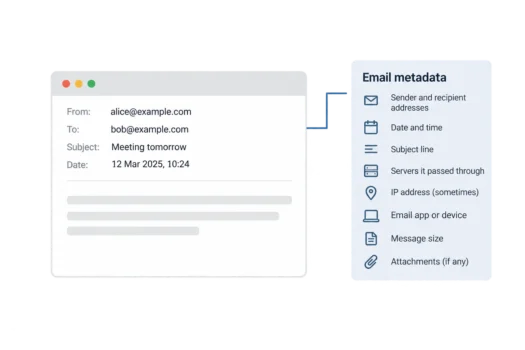
Email metadata is information about an email rather than what the message says. It includes who sent it, who received it, when it was sent and how it travelled. This information sits alongside the message, and much of it is stored in the email’s header.
What Counts as Email Metadata?
Email metadata includes information used to identify and deliver a message. Some details appear in your inbox, while others are recorded behind the scenes.
- Sender and recipient addresses: the addresses shown in the From and To fields, along with any Cc recipients.
- Date and time: when a message was sent and, in some records, received.
- Subject line: the short description above the message.
- Mail servers: the computers and services that handled the message.
- IP addresses: sometimes, a number identifying a device or service on the internet.
- Email app or device: information about the software used to send the message, when recorded.
- Message size and attachments: the size of the message and whether files were attached.
Much of the delivery information appears in the full email header, which contains more details than the fields shown in your inbox. As messages move between email servers, these servers can add records showing how they were handled.
Not every message contains every detail on this list. What is available depends on the email service, the software used and the information recorded during delivery.
Email Metadata vs Email Content
Think of an email like a letter in an envelope. The address, return address and postmark on the outside are comparable to metadata, while the letter inside is the content.
For an email, the content is mainly the text in the message body and any files or pictures attached to it. Metadata describes the message and its delivery rather than providing the message itself.
There is some overlap. The subject line is metadata, but its words can reveal what the message is about. A subject such as ‘Friday’s meeting’ gives someone a clue about the conversation without showing them the email body.
Who Can See Email Metadata?
Your email provider and the recipient’s provider need access to certain details to send and receive messages. Servers handling the email along the way can also see information needed to route it, although they do not all see or keep the same records.
The recipient can see the sender’s address, subject and time of the message. They can also open the full header to inspect additional delivery details not normally shown in the inbox.
Handling this information is not the same as reading what your emails say. The question of whether Gmail reads your emails concerns message content, while metadata is also handled as part of delivery.
Why Email Metadata Matters for Privacy
Email metadata matters for email privacy because it can reveal patterns even when the message itself is not read. A record of addresses, dates and times can show who communicates with whom, when and how frequently.
For example, someone with access to a record of messages might notice that two addresses exchange emails every weekday morning. They would not need to know what the messages say to identify that pattern.
Encrypted email can protect the content of a message from people who cannot decrypt it. However, email services still need addressing and delivery information to move an email to its destination, so encryption does not normally hide all of its metadata.
Can an Email Be Traced?
An email can sometimes be traced part of the way back through the servers that handled it. The full header often contains lines beginning with ‘Received’, which record stages in the message’s journey.
These records can show which email services or servers handled a message. However, following that route does not usually identify the person who wrote it or reveal where they live.
Can You Find an IP Address From an Email?
Sometimes you can find an IP address in an email’s full header, often within a Received line. However, that address may belong to a mail server rather than the person who sent the message.
Many large email services do not include the sender’s own IP address in outgoing messages. Inspecting a header will therefore not necessarily tell you which internet connection the sender used.
Even when a sender’s IP address is present, it can give at most a rough idea of their location and internet provider. It does not reveal an exact home address, and the location shown by an IP lookup may be inaccurate.
Email Tracking Pixels and Reducing What You Share
A tracking pixel is a tiny image in an email that may tell the sender when the message is opened, if the image loads. Email tracking pixels are different from delivery metadata because they collect information about what happens after the message arrives.
One way to limit information held about your messages is to use an email provider that collects and keeps less metadata. Data collection and retention policies differ among private email providers, and no provider can eliminate all the details needed to deliver email.
An email alias is another address you can use to receive messages in your main inbox without giving everyone your main address. An alias does not remove delivery metadata, but it can reduce how widely your main address is shared.
Be careful when sharing a full email header with someone else. It can contain addresses, server details and other information that is not obvious from the message shown in your inbox.