
 Bobby Wilson
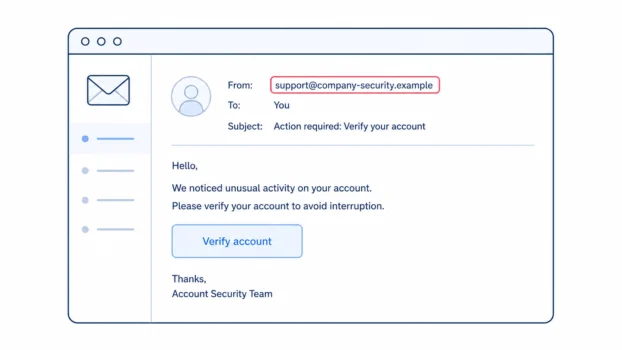
Phishing is a scam message that pretends to come from someone you trust so you click a link, open a file, pay money, or share private information such as a password. You spot it by checking what the message asks you to do, not just how genuine it looks.
What phishing means
Phishing is a trick. A message arrives looking as if it comes from a real person, company, bank, delivery service, subscription service, or official organisation. It asks you to do something that feels normal or urgent.
The message itself is only the bait. The real danger is the action it tries to get from you. That is why the best way to spot phishing is not to ask, “Does this look real?” It is to ask, “What is this message trying to make me do?”
The scammer may want your password, which is the secret word or phrase used to sign in to an account. If they get it, they may be able to open that account as if they were you. They may want card or bank details, which can be used for fraud. They may want personal information, such as your date of birth, address, or account details, because those details can make later scams more convincing. They may also want you to send money directly, often by making the payment sound routine or urgent.
Phishing usually arrives by email, but the same trick can also come by text message or phone call. A more targeted version is spear phishing, which is a phishing message aimed at one particular person, using real details about them to seem more convincing.
How to spot a phishing message
Check what the message asks you to do
The request matters more than the logo, the colours, or the writing. A message can look tidy and still be a scam. A message can use the right tone and still be trying to rush you into a bad decision.
Be careful if a message asks you to give private information, click a link to verify or confirm something, open an unexpected attachment, enter a password after following a link, update payment details through a link, move money, or buy vouchers. These are common phishing patterns because they all push you to take action inside the message.
A real organisation may send useful notices by email. It may tell you there is a message waiting, a delivery update, or a payment problem. But you do not have to use the link in that message. The safest check is not to inspect the message at all, but to leave it and reach the organisation the way you normally reach it.
This is the main rule. If the message is genuine, the same issue will usually appear when you sign in through a route you already trust. If it does not appear there, the message may not be real.
Check how the message pressures you
Phishing often works by pressure. The message may say something must be done today. It may say your account will be closed, your parcel will be returned, your payment has failed, or your access will be restricted. It may offer a refund, prize, discount, or other reward that feels too good to ignore.
Pressure alone does not prove a message is phishing. Real organisations do sometimes send time-sensitive messages. The warning sign is pressure combined with a link, an attachment, a payment request, a password request, or a request for private information.
Authority is another form of pressure. A message may claim to come from your bank, a delivery company, a tax office, a subscription service, your school, your workplace, or another organisation you are used to trusting. The name can make the request feel safe. Still, the request has to be checked. A simple rule helps: if a message makes you feel rushed, that feeling is the signal to slow down and check somewhere else.
Check the sender name and address
The name shown in your inbox is not always the real address. A display name is the name your email app shows first, and it can say almost anything. A message may appear to come from “Customer Support” or “Your Bank” while the full email address tells a different story.
A domain is the main part of an email address, the bit after the @ symbol, and sender addresses get easier to judge once you know how an email address is put together. In support@company.example, the domain is company.example. A lookalike address may use familiar words but belong somewhere else, such as support@company-security.example. It may also swap characters that look similar at a glance, so the address seems right when you are reading quickly.
Familiar words inside an address prove nothing. What matters is the main domain. A scam address may include the name of a real service somewhere, but that does not mean it belongs to that service.
An address check is worth doing, but it settles less than people expect. A sender address can be faked so that it looks exactly right, which is known as spoofing. A message can also come from a real address belonging to someone you know, because their account has been broken into and is being used to send scams. So a correct address is not proof that a message is genuine. That is why the address check has limits, and why the safest move is still to leave the message and reach the organisation the way you normally would.
On a computer, expand the sender details and read the full address. On a phone, tap the sender name to reveal the full address, but do this without touching any links in the message. If the address looks odd, or if you cannot tell, do not act on the message. Knowing how to tell if an email is real or fake makes these checks quicker.
Check where the link really goes
A link can say one thing while leading somewhere else. A button can hide the address completely. A shortened link can hide the destination too. This is why “the link text looked normal” is not enough.
On a computer, hover over a link without clicking and read the destination that appears. On a phone, pressing and holding a link usually shows the address without opening it, although this varies between phones and apps. Be careful not to tap through by mistake.
If there is any doubt at all, do not touch the link. A long web address can be hard to judge, especially on a small screen.
A QR code in an unexpected email should be treated with the same caution as a link. A QR code can take you to a website, but the destination is harder to see before you scan it. QR codes are not dangerous by themselves, but if an unexpected message asks you to scan one to sign in, pay, or verify an account, the same caution applies.
Why spelling mistakes are not enough
Bad spelling and clumsy design used to be useful clues. They can still be clues. But they are not enough any more.
A phishing message can be well written. It can use a convincing layout. It can include your name. It can look like the kind of message you receive all the time. None of that proves it is genuine.
The better rule is this: bad spelling can still be a clue, but good spelling does not make a message safe. Judge the request and the pressure, not the writing. If a polished message asks you to click a link, enter a password, update payment details, or act quickly, the same checks still apply.
This is not bad news. It means you do not have to become an expert in design, grammar, or technology. You only need to pause and ask what the message wants you to do.
What phishing messages look like
A parcel message might say:
Your parcel could not be delivered. A small redelivery fee is required. Arrange delivery today: delivery-update.example
The warning signs are the fee, the deadline, and the link. The message may not clearly prove which parcel it is about.
A bank warning might say:
Unusual activity has been detected on your account. Verify your details now to avoid restrictions: account-check.example
The warning signs are fear, urgency, and a request to verify details through a link.
A subscription message might say:
Your subscription could not be renewed. Update your payment details to keep access: billing-update.example
This looks routine, which is why it can work. The warning sign is that it asks for payment details through a message link.
A tax refund message might say:
You are eligible for a tax refund. Confirm your bank details to receive it: refund-service.example
The warning signs are the offer of money, the request for bank details, and the link.
What to do if you think a message is phishing
Do not reply. Do not click. Do not open attachments. Do not ring a number the message gave you. If you need to know whether the message was real, reach the organisation the way you normally reach it and look there instead.
Use the report option built into your email app if it has one, then delete the message. Reporting it helps your provider filter similar messages later. Many countries run a national service for reporting scams and fraud, which you can look up for where you live.
If money has already gone, or an account has already been taken over, that is a different situation from spotting a suspicious message, and dealing with a hacked email account takes a different set of steps.