
 Bobby Wilson
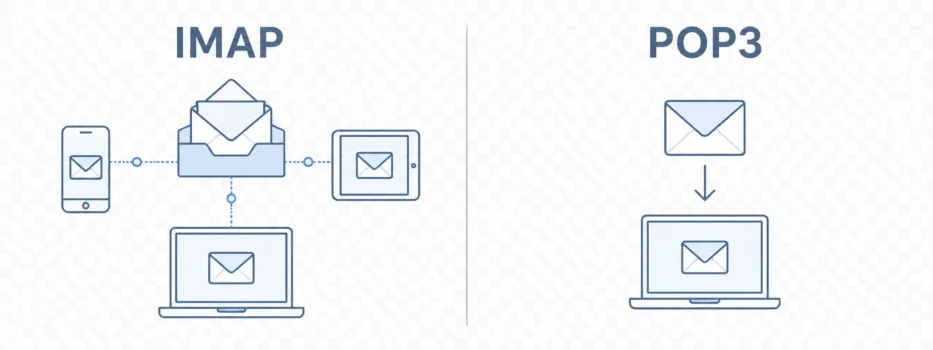
Choose IMAP unless you have a specific reason to use POP3. IMAP, or Internet Message Access Protocol, keeps your inbox in sync across devices. POP3, or Post Office Protocol version 3, downloads mail to one device and can remove it from the email service depending on settings.
That is the practical answer if you are setting up an email app and need to choose between the two. For most people today, IMAP is the safer and more useful default.
What to Know About POP3 First
The main thing to understand about POP3 is that it can remove messages from your email service after downloading them.
That does not always happen. It depends on the settings. But it is important because it can make email seem to disappear from other places.
For example, if POP3 downloads a message to one computer and removes it from the email service, that message may no longer appear in webmail or on your phone. The email has not vanished completely, but it may now live mainly on the device that downloaded it.
This is the main reason IMAP is usually the better choice for most people. It is less likely to create confusion across phones, laptops, tablets, and webmail.
What IMAP and POP3 Actually Do
IMAP and POP3 are both ways for an email app to collect or show mail from your email account.
A protocol is just a set of rules systems follow so they can work together. In this case, the rules are about how an email app talks to your email service so you can see your messages.
IMAP keeps your mail with your email service and lets your app show it. When you open your inbox on a phone, laptop, tablet, or browser, you are usually looking at the same mailbox. If you read a message on one device, it can show as read on another. If you organise your inbox, those changes can follow you.
POP3 works differently. It downloads mail from your email service to one device. Depending on the settings, it may leave a copy with the email service, or it may remove the message after downloading it.
This is why POP3 feels more like an older one-computer model. It can work, but it does not match the way most people use email now.
Most people expect their inbox to follow them. They want to read a message on a phone, reply later on a laptop, and still see everything in the same place. IMAP is built for that kind of use.
Which Should You Choose?
For almost everyone, choose IMAP.
IMAP is the better default because most people use email on more than one device. You might check messages on your phone during the day, use a laptop at work, and open webmail in a browser later. IMAP helps those places stay in step.
If you read a message on your phone, it can show as read on your laptop. If you delete or move a message, that change can be reflected elsewhere too.
That last point matters. IMAP is not a backup. If you delete a message, that deletion can also sync, although you may still be able to recover deleted emails for a limited time. IMAP keeps your inbox consistent across devices, but it does not mean every message is protected from mistakes.
POP3 is sometimes assumed to be the more private choice, because it can remove mail from the email service. That is a misunderstanding. Whether your email is private depends on whether the service protects your messages, not on which collection method you choose.
POP3 is not bad or wrong. It is just usually the wrong default for the way most people use email today.
POP3 can still make sense in specific cases. Someone may deliberately want to download mail to one computer. They may want a local copy for a particular setup. They may also be using an older email workflow that still depends on POP3.
But if you are unsure, that probably does not describe you. In a normal modern setup, IMAP is the clearer choice.
How This Fits With SMTP
IMAP and POP3 are about collecting or showing email in an app. They are not for sending email out.
SMTP is the sending side of email. IMAP and POP3 are about the inbox side: how an app gets or shows the messages that have already arrived.
This is why the names can appear near each other in email settings, even though they do different jobs.
Do You Need to Worry About IMAP or POP3?
Many people never need to choose between IMAP and POP3.
If you use Gmail, Outlook, Yahoo Mail, Proton Mail, Tuta, or another email service in its own website or app, the choice is usually hidden. You open the app, sign in, and your inbox appears.
You are more likely to see IMAP and POP3 when adding an email account to a third-party app. That might be an email app on your computer or phone that is not the same as your email provider’s own app.
Even then, you do not need to become technical. The useful rule is simple: IMAP is for a synced inbox across devices. POP3 is for downloading mail to one device.
That is enough for most setup screens.
If you are unsure, IMAP is usually the right choice. It matches the way most people use email now: one inbox, several devices, and changes that stay in step. POP3 still has a place, but it is best chosen deliberately, not by accident.